


Sign in with Google
If you’re looking for TikTok help because something suddenly “broke” (zero views, can’t post, locked out, region mismatch, or a suspension), you usually don’t need another generic tip. You need a fast triage that tells you what’s actually wrong, what you can fix in minutes, and what requires an appeal, a reset, or a fresh account.
This guide is written for marketers, founders, agencies, and growth teams who treat TikTok as a distribution channel (not a hobby) and need to get back online quickly.
Before you change five settings at once, run this quick diagnostic. It prevents false fixes and helps you isolate the root cause.
If the issue persists after these checks, jump to the matching section below.
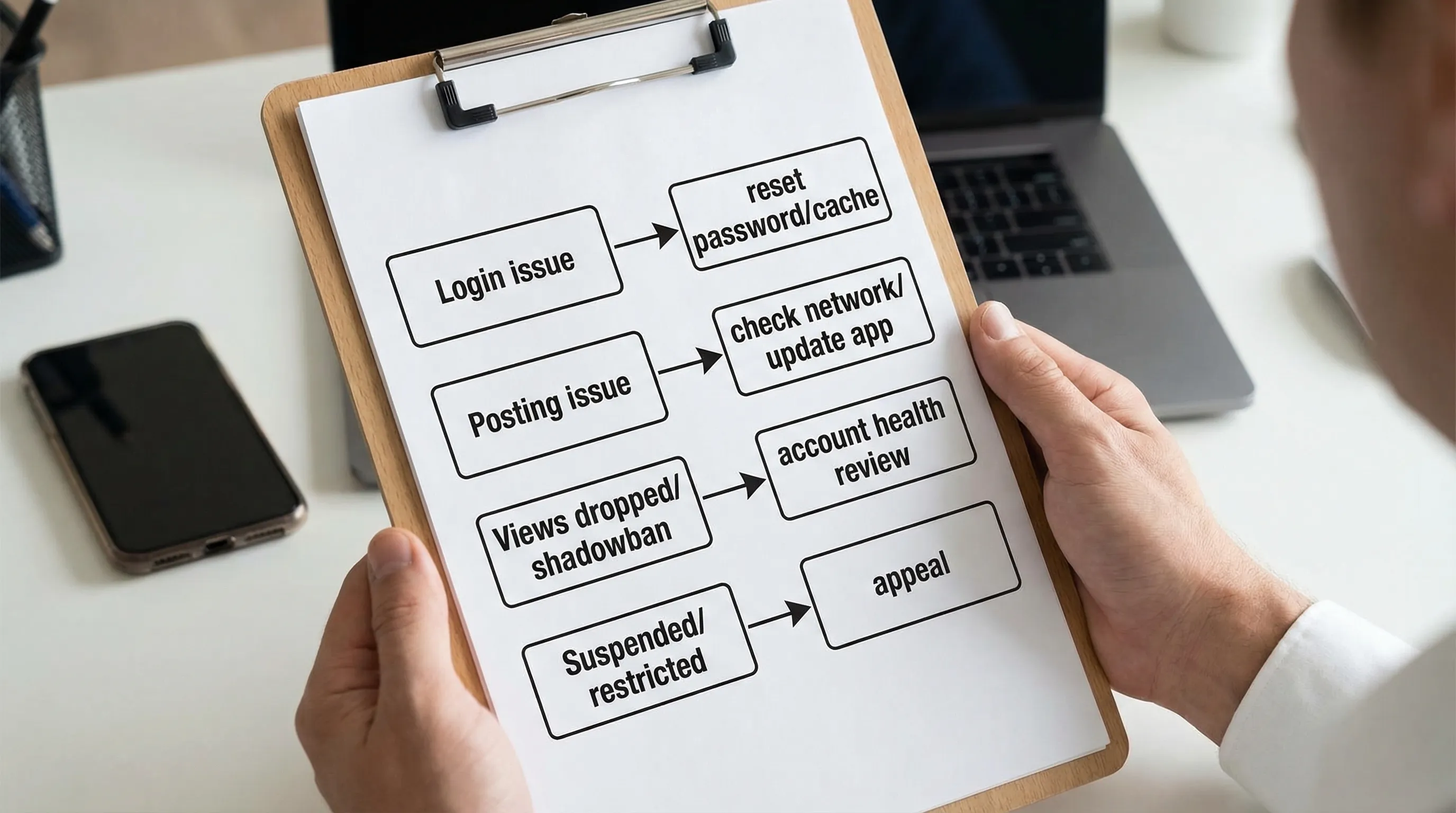
Reset password using the original sign-in method. TikTok accounts often “exist” under a specific identity (phone, email, Apple ID, Google). If you originally signed up with Apple, password resets through email can look like they’re “not working.” Use TikTok’s official recovery flow in the TikTok Help Center.
Remove conflicting logins. If you manage multiple accounts, you can accidentally create a new blank profile by logging in with the wrong method. Log out completely, then log back in with the correct provider.
Stop rapid-fire attempts. Repeated login attempts across devices and networks can trigger temporary security locks. Wait, then retry from one device.
If you’re locked out of a business-critical account, document everything before you submit a ticket:
Then submit through in-app support or TikTok’s support forms. It speeds up the back-and-forth.
This is one of the most common “TikTok help” searches because it can come from totally different causes: app bugs, connectivity, copyright flags, or account restrictions.
Try uploading:
If that works, the issue is usually the specific file, the audio, or metadata (caption/hashtags) rather than the account.
File issues. Re-export the video from your editor (CapCut/Premiere) and try again. Corrupt encodes and unusual codecs cause silent failures.
Copyright or music limitations. Some sounds are not available in every region, and some tracks get removed. If the upload fails or audio mutes after posting, switch to royalty-safe audio. TikTok also documents copyright basics in its policy resources and help pages (start from the TikTok Help Center).
“Community Guidelines” pre-checks. If your content is borderline (health claims, finance promises, adult themes), try a less risky version first to confirm posting is possible.
Temporary posting restrictions. If you spam-posted, rapidly followed/unfollowed, or reused the same clip across accounts, you may be temporarily limited.
“Shadowban” is overused, but view collapses are real. The fastest way to diagnose is to separate distribution problems from content performance.
Signals that often correlate with reduced distribution:
Also review the TikTok Community Guidelines and your in-app account status if available.
Post a low-risk format:
If that post distributes normally, your previous content likely hit a policy or quality filter (even if it wasn’t formally removed).
For growth teams, a huge percentage of “TikTok is broken” complaints are actually geo mismatch.
If you’re trying to reach the US/UK but your account is created and operated from another country, TikTok can keep initial distribution local. Many teams experience major reach suppression when the account’s operating signals don’t match the target audience. TokPortal’s internal benchmarks describe this as material reach loss when the geo doesn’t align.
If you’re scaling internationally, don’t debug forever on a fundamentally mis-localized setup. Use a real local account strategy.
TokPortal was built specifically for this: geo-verified TikTok and Instagram accounts in multiple countries, plus scheduling, analytics, and scale operations. (More on that below.)
This is where “fastest way” means: stop guessing, gather evidence, and appeal cleanly.
Use TikTok’s in-app appeal flow first because it’s tied to your account action. Keep it factual:
If the issue is ads-related, be especially careful. Suspensions can freeze spend and access. (If you run paid, you should also have an organic-first plan so one account action doesn’t zero out your distribution.)
This is the fastest-growing category of TikTok help requests for global brands.
TikTok uses multiple signals to decide where to test your content first, including device region signals, SIM/network signals, and engagement patterns. Changing a single setting rarely overrides the full stack.
These can help when you are close to the target market already. They often fail when you’re operating cross-border at scale.
If you’re a founder, agency, UGC studio, or label trying to consistently reach multiple countries, the “real” fix is operational:
TokPortal is designed for exactly this workflow. You can create geo-verified accounts in 9+ countries (USA, UK, France, Canada, Japan, Australia, Italy, Germany, Spain), then manage posting and analytics in one place.
If you want the full setup details, start with TokPortal’s Quick Guide.
Most “account issues” at scale are self-inflicted by operations:
Pick one:
Option A: reduce variables for 72 hours. Keep one device per account, one posting operator, and one content style. Your goal is to restore predictable distribution.
Option B: centralize operations. If TikTok is a serious growth channel, treat it like infrastructure.
TokPortal positions itself as that operating system: create local accounts, schedule posts across timezones, bulk upload, and monitor analytics per market in a unified dashboard. It also supports API access for teams that want programmatic workflows.
You can learn more on the TokPortal homepage or review plans on the pricing page.
If you suspect compromise, speed matters more than optimization.
TikTok’s support documentation and in-app security settings are your primary source of truth here (start at the TikTok Help Center).
If someone is copying your brand handle and posting scams:
If TikTok is a growth lever for your business, prevention is a cost-saving strategy.
Here’s a practical baseline that avoids many recurring TikTok help emergencies:
If you’re building international organic distribution, your biggest unlock is usually not another hook template. It’s removing operational friction so you can test more markets, more formats, more consistently.

What’s the fastest way to get TikTok help from a real person? The fastest path is usually in-app: report the issue from the affected account, include exact error messages, and attach screenshots. Keep one clear ticket instead of many.
Why am I getting 0 views on TikTok all of a sudden? The common causes are a new account trust reset, a policy filter on recent content, temporary action limits, or geo mismatch (your account signals don’t match the audience you want).
How long does a TikTok shadowban last? There’s no official “shadowban” timer. If distribution is limited due to account health or content flags, it can resolve in days or persist until you change patterns and post clean, policy-safe content.
Why is TikTok showing my videos in the wrong country? TikTok uses location and engagement signals to decide where to test content. If you’re operating from outside your target market, it may keep distribution local. A reliable fix is to post from genuine local accounts in each country.
Can I use a VPN to fix TikTok country targeting? VPNs can work for light testing, but they’re unreliable at scale and can trigger security flags. For consistent cross-border organic reach, teams typically move to true local account setups.
If your “account issues” are really operations issues (multiple markets, timezones, and accounts), TokPortal is built for that. It helps you create geo-verified TikTok/Instagram accounts in key countries, schedule and bulk upload with timezone support, and track analytics per market from one platform.

 Any question? Contact us.



%401x.svg)