TikTok support can feel like a black box, especially when you are responsible for keeping multiple accounts healthy and posting on schedule. For TikTok managers, “tik tok customer service” is less about finding a phone number and more about knowing which channel to use, what evidence to collect, and how to escalate without triggering more automated flags.
This guide is written for operators and aspiring TokPortal managers who want a practical, 2025-ready escalation playbook you can use when something breaks, gets restricted, or is wrongly removed.
What “TikTok customer service” actually looks like in 2025
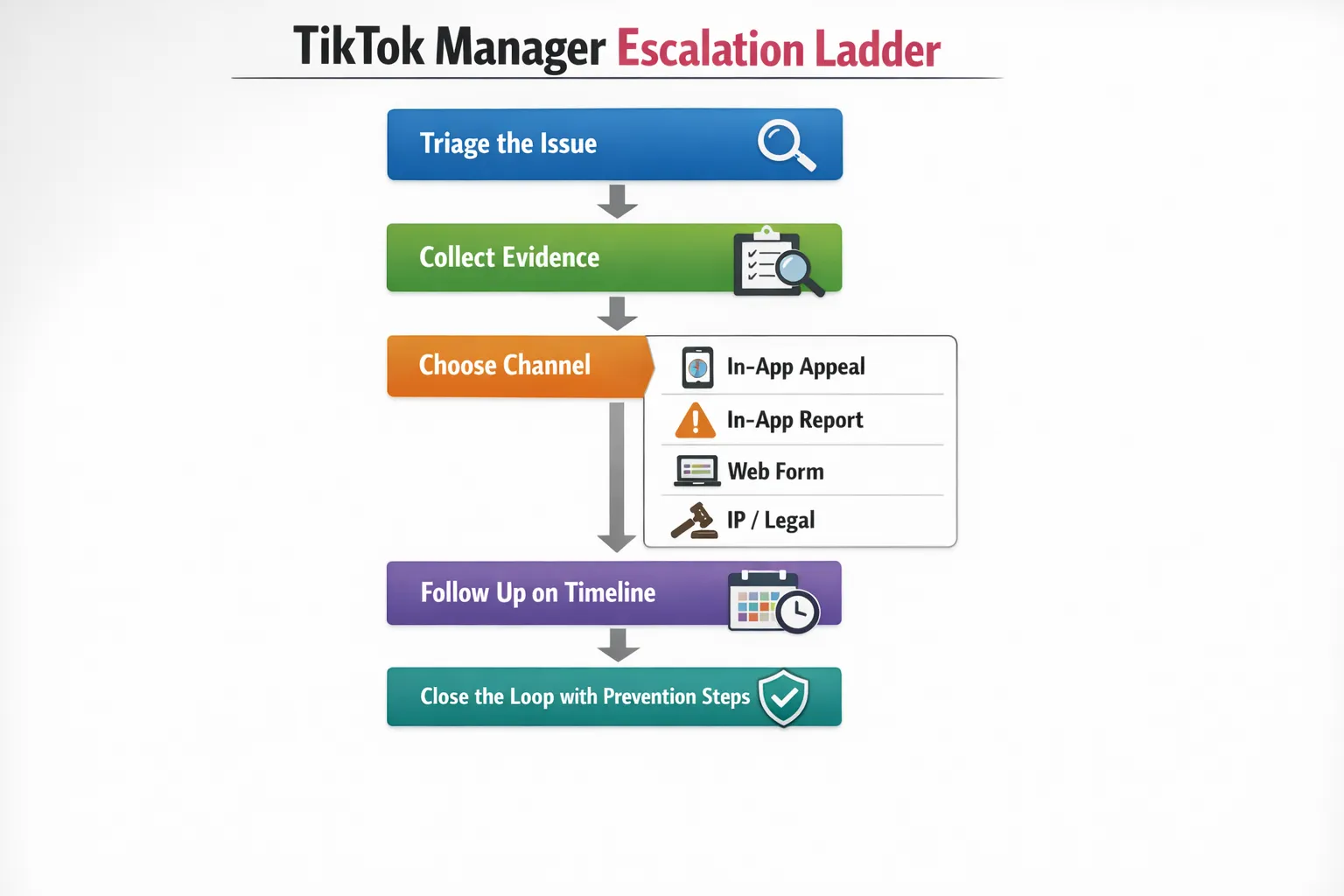
TikTok is built to handle most issues through self-serve flows and automated review. In practice, you typically have five support surfaces, each suited to a different kind of problem:
- In-app “Report a problem” (best for account access, posting bugs, feature issues, and some enforcement questions)
- In-app appeals (best for content removals and account restrictions, because the appeal is attached to the enforcement event)
- Web reporting forms (useful when the app flow is blocked, or when you need to attach more context)
- IP and legal reporting (copyright/trademark channels live separately from community guideline appeals)
- Regulatory escalation in some regions (for example, the EU’s Digital Services Act pushes platforms to offer complaint and dispute options)
TikTok publishes policy and enforcement context in its Transparency Center. Managers who can map an issue to the right channel usually resolve faster than managers who repeatedly submit generic tickets.
The manager mindset: treat every support request like an incident
When you manage posting operations, support is not a “help me” message, it is an incident report. The goal is to make it easy for a reviewer (human or automated) to confirm:
- What happened
- When it happened
- Which asset was affected (account, video, device)
- Which policy or system behavior caused it
- What outcome you are requesting
Before you open any ticket or appeal, do a quick “stability pass” so you do not accidentally make the problem worse:
- Pause posting on the affected account until you understand the restriction type
- Avoid rapid retries (re-uploading the same clip repeatedly can look like spam)
- Keep logins stable (frequent device or network changes can trigger security systems)
Build a “support packet” before you escalate
TikTok responses are often faster when your first message contains everything needed to verify the issue. Create a reusable support packet template you can fill in within 3 to 5 minutes.
Include:
- Account identifier: @username, country/region of the account, and approximate account creation date
- Device and app context: phone model, OS version, TikTok app version
- Time and timezone: exact timestamps when the issue occurred
- Asset IDs: video link, video ID, enforcement notice ID, appeal reference number (if available)
- Screenshots or screen recordings: the exact error message, restriction banner, or removal notice
- Steps to reproduce: what you did right before it happened (upload, schedule, edit, comment, follow)
- Your requested outcome: restore video, lift restriction, unlock login, confirm policy reason, etc.
Keep it factual. Reviewers tend to ignore emotional context and respond to verifiable details.
Choose the right escalation path (by problem type)
Access and security issues (locked out, hacked, suspicious login)
These are the highest priority because delays can lead to permanent loss of access.
What to do first:
- Try official recovery flows in-app (password reset, verification prompts)
- Change the password from a known-safe device if you can still access
- Enable 2-step verification and remove unknown devices/sessions (where available)
When to contact support:
- Use in-app “Report a problem” if you can open TikTok at all
- If you cannot access the app, use TikTok’s web feedback pathways (region varies) and provide proof you control the account (email/phone ownership, prior usernames, creation context)
Manager tip: support is more likely to help when you can prove continuity (same phone number, same email, consistent device history). Rapid device switching during recovery can look like an active hijack.
Account restrictions and suspensions (temporary posting ban, feature bans, full suspension)
Restrictions come in multiple forms, and your next step depends on which one you have.
Common patterns:
- Feature restriction: posting, commenting, following, or live is blocked for a time window
- Integrity limitation: reach drops sharply and you see “account at risk” warnings
- Full suspension/ban: account cannot be used, often after multiple strikes
Best escalation route:
- If you received a notice inside TikTok, use the in-app appeal attached to that notice first
- If the account is suspended without a clear notice, file a structured in-app report with your support packet details
What to say in an appeal (what reviewers can verify):
- Acknowledge the cited policy area if shown
- Explain intent and context in one or two sentences
- Point to evidence inside the content (for example, educational context, parody cues, original filming)
- Ask for a manual review
What not to do:
- Do not submit multiple contradictory stories across tickets
- Do not threaten legal action in the first message (save formal steps for later escalation)
- Do not attempt “workarounds” that violate policy (these can escalate enforcement)
Content removals and strikes (Community Guidelines)
For removals, speed and specificity matter. Most successful appeals are short and aligned to a single policy question: “Was this actually a violation?”
Use this process:
- Open the removal notice, screenshot it, and check whether it names a policy category
- If the content is borderline, review TikTok’s current Community Guidelines and identify the likely trigger
- File the in-app appeal with a minimal, factual explanation and request human review
If the same format keeps getting removed across accounts, you likely have a repeatable “false positive” pattern (words on screen, a gesture, a medical claim, an adult topic). Fix the template before you post again.
Copyright and trademark problems (IP complaints)
IP issues should not be appealed as “guidelines mistakes.” They have their own logic, and TikTok routes them differently.
When you see a copyright/trademark claim:
- Determine whether it is about audio, visuals, or branding
- If you have rights or authorization, use TikTok’s IP reporting and counter-notice processes via the IP reporting portal
- If you do not have rights, remove or replace the disputed elements (re-uploading without changes often repeats the strike)
Manager tip: keep a simple internal record of music sources and usage rights for branded campaigns. It saves hours when a claim arrives weeks later.
“Shadowban” and reach drops (what you can actually diagnose)
TikTok rarely uses the word “shadowban,” and support rarely confirms it. Still, managers see real distribution issues.
Treat this like a diagnostics problem, not a support problem, until you have a clear enforcement signal.
Check:
- Account status/notifications: any warnings, strikes, or feature restrictions
- Analytics: sudden drop in For You Page distribution, unusually low completion rates, unusually high “Not interested” signals
- Content risk: repeated calls-to-action, repetitive metadata, borderline topics, misleading claims
- Operational noise: too many deletes/re-uploads, sudden posting bursts, aggressive follow/unfollow behavior
Escalate to support only when:
- You see an explicit restriction notice, or
- A technical bug prevents normal posting or analytics for more than 24 to 48 hours
Otherwise, your best fix is content and operational hygiene.
How to write a support message that gets useful responses
Most TikTok support threads fail because they are vague. Use a consistent structure that mirrors how internal triage works.
Copy-ready template (edit brackets):
- Subject: [Account restriction / Video removal / Login issue] for @username in [country]
- What happened: On [date, time, timezone], [describe the exact restriction/error shown].
- Where: Affected asset(s): [video link(s) or ID(s)], notice ID: [ID].
- Context: [One sentence on what you were doing right before it happened].
- Evidence: Attached screenshots: [list]. Device/app: [model, OS, app version].
- Request: Please review and [restore / lift restriction / confirm policy reason / unlock access].
Two rules that consistently help:
- One issue per ticket: do not bundle five problems into one message
- One clear ask: reviewers move faster when the “request” line is explicit
Follow-up timeline: when to wait, when to re-file, when to escalate
TikTok response times vary by region, account history, and issue type. Managers need a simple timeline so you do not spam support or miss windows.
A practical follow-up rhythm:
- Appeals: submit once, then wait for the decision. If denied, only re-submit if you have new evidence or the decision references the wrong content.
- Technical bugs: if no response after 48 to 72 hours, re-file with the original ticket reference and additional reproduction details.
- Access/security: escalate sooner, within 24 hours, because account recovery gets harder as time passes.
If you operate in the EU and believe an enforcement decision is wrong, you may have additional complaint pathways under the DSA, depending on the scenario and TikTok’s current implementation. Start by reading TikTok’s own transparency and policy disclosures, then decide whether formal escalation is justified.
The hidden skill TokPortal managers develop: escalation without triggering risk
TokPortal managers are operators. You are not just posting, you are protecting continuity across accounts, time zones, and content calendars. The best managers learn to balance two priorities:
- Keep output consistent (so accounts grow steadily)
- Avoid behavior that looks automated or unsafe (which can increase restrictions)
That is why escalation skills matter. When something breaks, you need to resolve it quickly, but you also need to keep your actions predictable and policy-aligned.
If you are exploring remote, operations-focused work in TikTok publishing, TokPortal is built around organic posting at scale and requires careful, detail-oriented managers. You can learn more about the platform at TokPortal.

Close the loop: prevention notes you should log after every case
Every resolved ticket should leave behind a short prevention note so you do not repeat the same issue next month.
Log:
- The restriction type and root cause (best guess if TikTok does not confirm)
- Which channel solved it (appeal, in-app report, web form, IP portal)
- Time to resolution
- The content or operational change you made afterward
Over time, this becomes your personal “manager playbook,” and it is one of the fastest ways to become genuinely valuable in a multi-account environment.
If you can stay calm under pressure, write clean incident reports, and keep accounts compliant while posting consistently, you already have the core traits needed to succeed as a TokPortal manager.




 Any question? Contact us.



%401x.svg)